

Best overall: HubSpot. Best for sales pipeline control: Pipedrive. Best for session-based coaching administration: Paperbell. This 2026 guide compares five CRM and client-management options by the work you need to manage, from discovery calls to paid coaching engagements.
- HubSpot is the best CRM for coaching business owners who need a central sales pipeline and contact history.
- Pipedrive suits coaches who organize selling around clear stages and scheduled follow-up.
- Dubsado and HoneyBook suit project-based client administration; Paperbell suits scheduling and coaching packages.
- Bridgetbakerbranding provides branding, Squarespace website design, and visibility coaching—not CRM software.
Why this matters
A coaching business has two different workflows: winning the client and serving the client. A sales CRM organizes prospects, conversations, and next actions. A client-management platform organizes the engagement after someone decides to work with you.
Choose against the wrong workflow and you add another place to maintain records without solving the actual problem. Before comparing dashboards, identify whether you lose track of discovery-call follow-up, client paperwork, or session administration.
Bridgetbakerbranding is best for coaches who need branding, Squarespace website design, and visibility coaching rather than CRM software. The Bridgetbakerbranding agency serves coaches, speakers, authors, and founders; the software below handles a different part of your business.
What makes the best CRM for a coaching business?
Use these criteria to choose your CRM in 2026. A long feature list does not establish whether a tool fits your coaching model.
- Contact history: You need to see who the person is, what you discussed, and what happens next without reconstructing the relationship from scattered messages.
- Sales visibility: Your system should distinguish a new inquiry from a completed discovery call, an open proposal, and a won engagement.
- Follow-up discipline: Choose a workflow that makes the next action visible. A contact database alone does not tell you whom to call today.
- Engagement administration: Decide whether proposals, contracts, invoices, scheduling, or package management belong in the same system as your prospect records.
- Practical maintenance: Test the work of updating records. Your CRM needs to remain useful when you are busy delivering sessions, not just during setup.
- Website handoff: Trace the path from your inquiry form to a usable prospect record. Confirm the connection you intend to use before committing.
For a coaching practice, prioritize the weakest link in that chain. If discovery calls happen but follow-up disappears, start with sales management. If clients say yes but onboarding becomes a paperwork chase, start with engagement administration.
Best coaching CRM tools at a glance
These options are not interchangeable. HubSpot and Pipedrive center on sales relationships; Dubsado, HoneyBook, and Paperbell address more of the administrative work surrounding client engagements.
| Tool | Best for | Standout capability | Key limitation for this decision |
|---|---|---|---|
| HubSpot | Relationship-led sales | Contacts, deals, and sales activities in a shared CRM | Requires a clear process to avoid an overbuilt setup |
| Pipedrive | Stage-based selling | Visual deal pipelines and activity management | Sales organization is not the same as coaching delivery |
| Dubsado | Customized onboarding | Forms, proposals, contracts, invoices, and workflows | Custom workflows require setup and maintenance |
| HoneyBook | Project-based engagements | Client projects with proposals, contracts, and invoicing | A project-centered approach is not every coach's preferred sales workflow |
| Paperbell | Session-based coaching | Scheduling, payments, and coaching package administration | Coaching administration is a different priority from sales pipeline depth |
Treat this table as a decision tree, not a claim that every coach needs the first tool. A solo coach selling scheduled packages has different requirements from a founder managing a stream of longer sales conversations.
1. HubSpot: best CRM for relationship-led coaching sales
HubSpot is a CRM platform with contact records, deal pipelines, and sales activities. For a coaching business, those capabilities provide a place to organize prospective clients and the conversations leading to an engagement.
HubSpot is the default recommendation in this 2026 shortlist when your main problem is sales visibility. Choose it because you need to track relationships—not because you want every available business function in one account.
A practical coaching pipeline starts with 5 stages: inquiry received, discovery scheduled, discovery completed, proposal sent, and decision recorded. These are suggested stages, not a required HubSpot configuration. Change them to reflect how you actually sell.
HubSpot pros:
- Contact records give your sales information a common home.
- Deal pipelines distinguish opportunities from general contacts.
- Sales activities support a defined follow-up process.
HubSpot cons:
- A broad platform gives you more setup decisions than a narrowly focused coaching tool.
- Organizing the sale does not, by itself, define how you deliver sessions or manage client progress.
Best for: Coaches and founders who need a repeatable process for inquiries, discovery calls, and open opportunities.
Verdict: Buy HubSpot for relationship-led sales; skip unnecessary setup until your pipeline works.
2. Pipedrive: best CRM for stage-based coaching sales
Pipedrive is a sales CRM organized around deals, pipeline stages, and activities. It suits a coach who wants a direct view of which opportunities need attention and what action comes next.
Choose Pipedrive when your sales process is clear but execution is inconsistent. An open deal should represent a specific potential engagement, not merely someone who joined your mailing list.
Before selecting it, write down what moves a prospect between stages. A completed discovery call is an observable event; feeling that someone is interested is not. Clear entry conditions make a visual pipeline more useful.
Pipedrive pros:
- A visual pipeline makes deal stages explicit.
- Activity management keeps follow-up attached to selling.
- Deal-based organization suits practices with identifiable engagement opportunities.
Pipedrive cons:
- You still need to define stages and maintain the records.
- A sales-centered workflow does not replace your coaching delivery process.
Best for: Coaches who already know their sales steps and need consistent follow-through.
Verdict: Buy Pipedrive for pipeline discipline; hold if onboarding is the problem you actually need to fix.
3. Dubsado: best client management for customized onboarding
Dubsado is a client-management platform with forms, proposals, contracts, invoices, and workflow automation. It belongs on this shortlist because some coaches searching for a CRM actually need a better path from acceptance to onboarding.
Dubsado is the stronger fit here when your engagements require a tailored administrative sequence. Think about the documents and decisions a client encounters, rather than treating automation as a goal in itself.
Start by drafting the onboarding sequence in plain language. Identify which message requires your judgment, which document the client completes, and which administrative task can follow a defined trigger. Automate only after that sequence is clear.
Dubsado pros:
- Forms support structured information gathering.
- Proposals, contracts, and invoices address engagement paperwork.
- Workflows help organize repeatable administrative steps.
Dubsado cons:
- Customized workflows take time to design and check.
- A detailed onboarding system does not automatically create a disciplined prospecting process.
Best for: Coaches whose client engagements need customized intake, paperwork, and administrative follow-through.
Verdict: Buy Dubsado for tailored onboarding; wait until you can describe the process before building automation.
4. HoneyBook: best client management for project-based coaching
HoneyBook organizes client work around projects and provides tools for proposals, contracts, and invoicing. That structure fits coaching engagements you manage as defined pieces of client work.
Consider HoneyBook when you want the engagement and its administrative documents grouped together. It is a different choice from selecting a sales CRM primarily to track prospect conversations and deal stages.
For your 2026 comparison, use a representative engagement: an inquiry, an agreed scope, a signed agreement, and an invoice. Check whether organizing that work as a project matches the way you think about your clients.
HoneyBook pros:
- Projects provide a container for individual engagements.
- Proposals and contracts support the agreement process.
- Invoicing connects the administrative workflow to payment requests.
HoneyBook cons:
- Project organization is a poor fit if you mainly want a prospect-first sales view.
- You still need a separate definition of how coaching sessions and client progress are managed.
Best for: Coaches who treat each engagement as a defined client project with associated documents.
Verdict: Buy HoneyBook for project-based administration; skip it as a default if your priority is sales pipeline control.
5. Paperbell: best coaching software for session administration
Paperbell is coaching software centered on scheduling, payments, and coaching packages. It is the most directly coaching-focused option in this list, rather than a general sales CRM.
Choose Paperbell when the administrative problem surrounds booking and managing coaching engagements. This is a different need from tracking a prospect through several conversations before a buying decision.
Write down the package structure you intend to manage before evaluating the software. Check how scheduling, payment, and the client's engagement fit together, using your actual coaching model rather than an idealized demonstration.
Paperbell pros:
- Coaching packages provide a relevant organizing structure.
- Scheduling addresses the practical work of arranging sessions.
- Payment handling sits alongside coaching administration.
Paperbell cons:
- A coaching-first workflow is not the same as a sales-first CRM.
- Package administration does not replace your method for recording coaching goals and progress.
Best for: Coaches whose priority is administering scheduled coaching packages rather than managing a complex sales process.
Verdict: Buy Paperbell for session-based administration; hold if your main requirement is detailed opportunity management.
How these CRM recommendations were ranked
The ranking follows the criteria above: contact history, sales visibility, follow-up, engagement administration, maintenance, and website handoff. HubSpot takes the default sales slot; each alternative has a distinct job rather than competing for the same generic recommendation.
This is a workflow-based shortlist, not a performance benchmark. No recommendation depends on an invented test score, customer count, or promised improvement in conversions.
For 2026, confirm the current functions included in the configuration you intend to use. A platform name alone does not establish that your required website connection or administrative workflow is supported.
Test the handoff before choosing your CRM
Run a 30-minute workflow walkthrough with 3 sample records: a new prospect, an undecided prospect, and a new client. Those are suggested evaluation limits, not claims about implementation time. The point is to test different states of the relationship instead of admiring an empty dashboard.
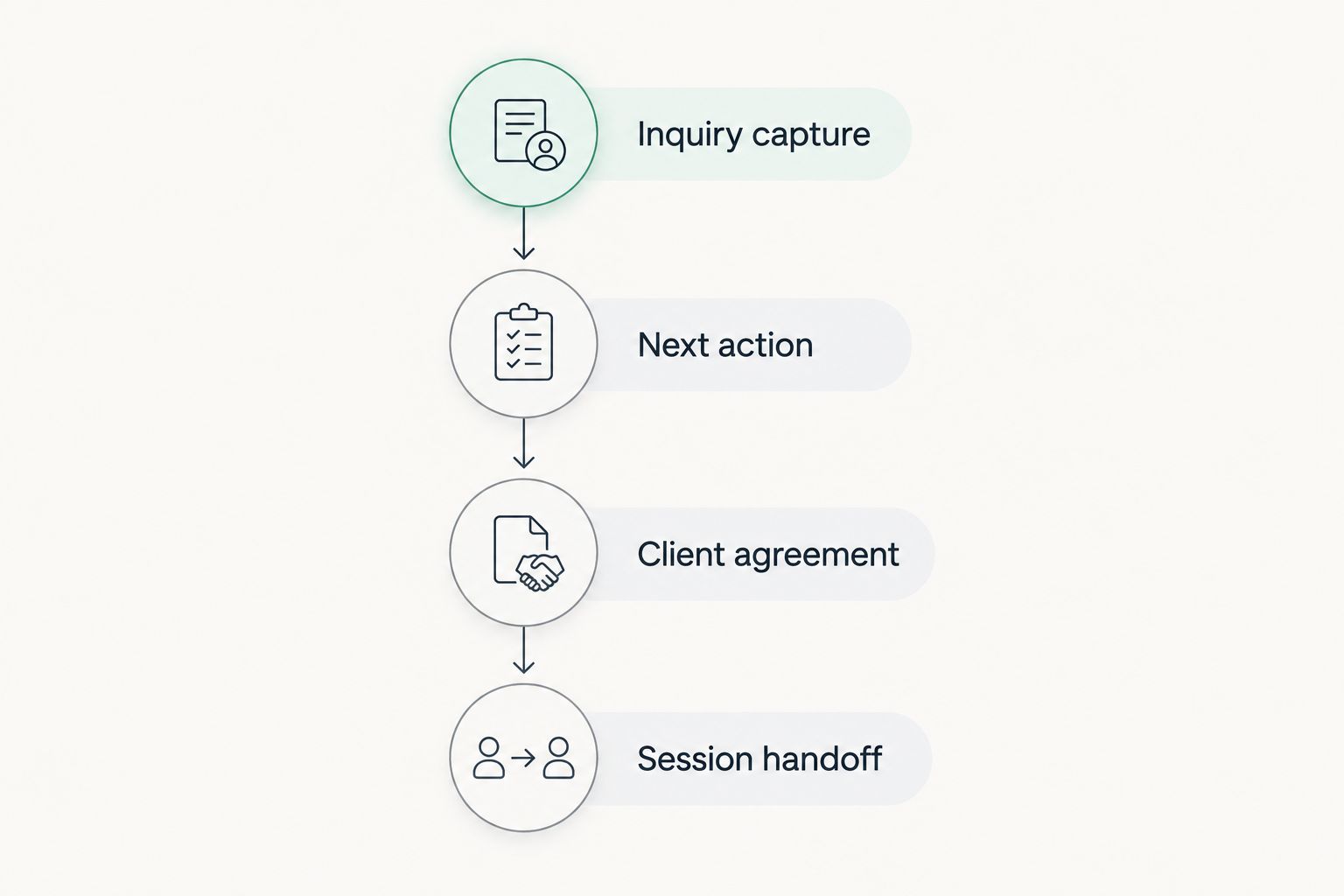
Follow this sequence:
- Inquiry capture: Start where a prospective client expresses interest. Check what information becomes a record and what you must enter manually.
- Next action: Assign a specific follow-up. Confirm that you can find it without rereading the entire conversation.
- Client agreement: Move the accepted engagement into your agreement process. Check which details require re-entry.
- Session handoff: Identify where booking and client delivery begin. Keep the boundary between sales administration and coaching records clear.
Keep sales notes separate from detailed coaching-session records. A prospect record needs the context required for follow-up, not an unnecessary account of personal disclosures. Decide what belongs in each system before importing existing notes.
Bridgetbakerbranding's Squarespace website design service addresses the website side of this journey. When planning that work, define the inquiry handoff as a requirement; do not assume a particular CRM connection exists without checking it.
Which CRM should you choose?
Choose HubSpot if you are undecided and your primary need is tracking prospects and sales conversations. Choose Pipedrive when clear stages and next actions define your selling process. Both decisions start with sales work, not session administration.
Choose Dubsado for customized onboarding, HoneyBook for project-centered engagements, or Paperbell for coaching package administration. Do not install several overlapping tools before deciding which system owns each record.
Write a short ownership rule: prospects live in the sales system; accepted engagements move into the client workflow; coaching notes belong in your chosen delivery process. One product can cover multiple responsibilities, but the responsibilities still need clear boundaries.
FAQ
What's the best CRM for a coaching business in 2026?
HubSpot is the default recommendation for a coaching business that needs contact history, deal tracking, and sales follow-up. Choose a client-management or coaching platform instead when your main problem is onboarding or session administration.
Is Pipedrive better than HubSpot for coaches?
Pipedrive is the more targeted recommendation here for coaches who organize selling around pipeline stages and activities. HubSpot takes the default slot for relationship-led sales; test the same prospect workflow in both before choosing.
Should a coach choose Dubsado or HoneyBook?
Choose Dubsado for customized onboarding workflows and HoneyBook for project-centered client administration. Both address engagement paperwork, so the deciding factor is how you want to organize the work.
Is Paperbell a CRM for coaches?
Paperbell is coaching software focused on scheduling, payments, and coaching packages. Treat it as a coaching-administration option rather than assuming it serves the same purpose as a sales CRM.
Can I use a CRM with a Squarespace coaching website?
Select a CRM only after confirming how your Squarespace inquiry process will connect to it. Check the specific form, connection method, required functions, and manual steps instead of assuming compatibility from the platform names.
Do I need a CRM before I have lots of coaching clients?
Choose a CRM when your current process no longer keeps inquiries, conversations, and next actions clear. Client count alone does not determine the decision; the work you need to organize does.
Does Bridgetbakerbranding provide CRM software?
Bridgetbakerbranding is a branding, Squarespace website design, and visibility coaching agency, not a CRM software vendor. Its services address your positioning, website, and visibility rather than replacing the tools in this comparison.
One last thing
An open opportunity without a next action is just a stored name. Before migrating your contacts in 2026, review each active prospect and record the next decision or conversation required.
Then configure the software around those real actions. Your best CRM is the one that makes the next useful step clear—not the one that gives you the most fields to fill.