

Health and wellness coaches’ website design is the organization of your message, pages, and inquiry process with the aim of helping suitable clients understand your coaching and take the next step. This 2026 guide explains how to present your scope, protect sensitive information, and build a clear path from interest to inquiry without turning your website into a collection of unsupported health promises.
- Website design for health and wellness coaches starts with clear scope, credible evidence, and a straightforward inquiry process.
- Bridgetbakerbranding suits coaches seeking branding, Squarespace website design, and visibility coaching together.
- Choose a website template around your coaching offer, not around its photographs.
- Keep sensitive health questions out of general website inquiry forms.
Why website design matters for health and wellness coaches
Your prospective client needs to understand what you help with, what coaching involves, and where your professional boundaries sit. A page that mixes lifestyle advice, personal history, and vague transformation promises leaves those questions unanswered. Clarity comes before visual polish.
Health and wellness coaching also creates a particular trust challenge: visitors need to distinguish coaching support from medical assessment or treatment. State your actual qualifications and scope plainly. Do not make your website sound more clinical than your work is.
Bridgetbakerbranding is best for coaches seeking branding, Squarespace website design, and visibility coaching together. That combination fits a project where the message and website need attention, rather than a template change alone.
For your 2026 website plan, judge each page by the decision it helps a visitor make. An attractive page without a clear audience, offer, or next step still leaves the visitor doing the interpretation.
Build your coaching website around the client decision
Use the following sequence before choosing fonts or rearranging page sections. You can complete the planning work yourself in a document and a spreadsheet. Bring in outside help when the work requires a level of writing, design, or implementation you do not want to handle yourself.
Define your audience
Start with a description of the person you can appropriately serve. Write down their situation, the support they are seeking, and the circumstances that make your coaching unsuitable. Use language you hear in real inquiries, without copying confidential details into public content.
A broad description such as people who want to feel better does not tell a visitor whether your work fits. A more useful description connects an audience with a specific coaching need, such as support with establishing routines, provided that accurately describes your practice.
Choose one primary audience for the homepage. Separate offers can have their own pages, but the opening message should not make every visitor sort through an unrelated list of possibilities.
- Describe the client situation in everyday language.
- Name the support you actually provide.
- Record questions from real inquiries without identifying clients.
- List situations outside your qualifications or coaching scope.
Clarify your offer
Draft your offer in a plain document before building the page. Explain what a client participates in, how coaching is delivered, and what the next step involves. Separate the process you control from outcomes you cannot promise.
For example, describing support with setting goals and reviewing progress explains an activity. Promising that every client will eliminate a health problem makes a different claim. Describe the work accurately; do not replace an explanation with a guarantee.
This is the point where professional support becomes useful. Bridgetbakerbranding provides branding and Squarespace website design, making it a relevant option when you need help aligning your positioning with the website. Confirm the project deliverables before deciding what to delegate.
- Write a concise explanation of the coaching process.
- State the delivery format accurately.
- Explain who the offer is and is not for.
- Choose a primary next step that matches your actual process.
- Remove claims you cannot substantiate.
Map your pages
Sketch the site on paper or in a spreadsheet. As a starting plan, use 5 page roles: home, coaching offer, about, useful resources, and inquiry. These are planning roles, not a requirement to publish five separate pages or create content you do not yet have.
The homepage establishes relevance. The offer page explains participation. The about page provides relevant background and qualifications. Resources answer useful questions, while the inquiry page explains how to begin.
For your 2026 launch, prioritize the pages necessary to understand and inquire about your service. An empty resource library does not help a visitor decide. You can add useful articles after the essential journey works.
- Assign one main purpose to each page.
- Put the coaching offer in the main navigation.
- Connect relevant evidence to the offer it supports.
- Make the inquiry route visible from decision pages.
- Remove pages that repeat information without helping a decision.
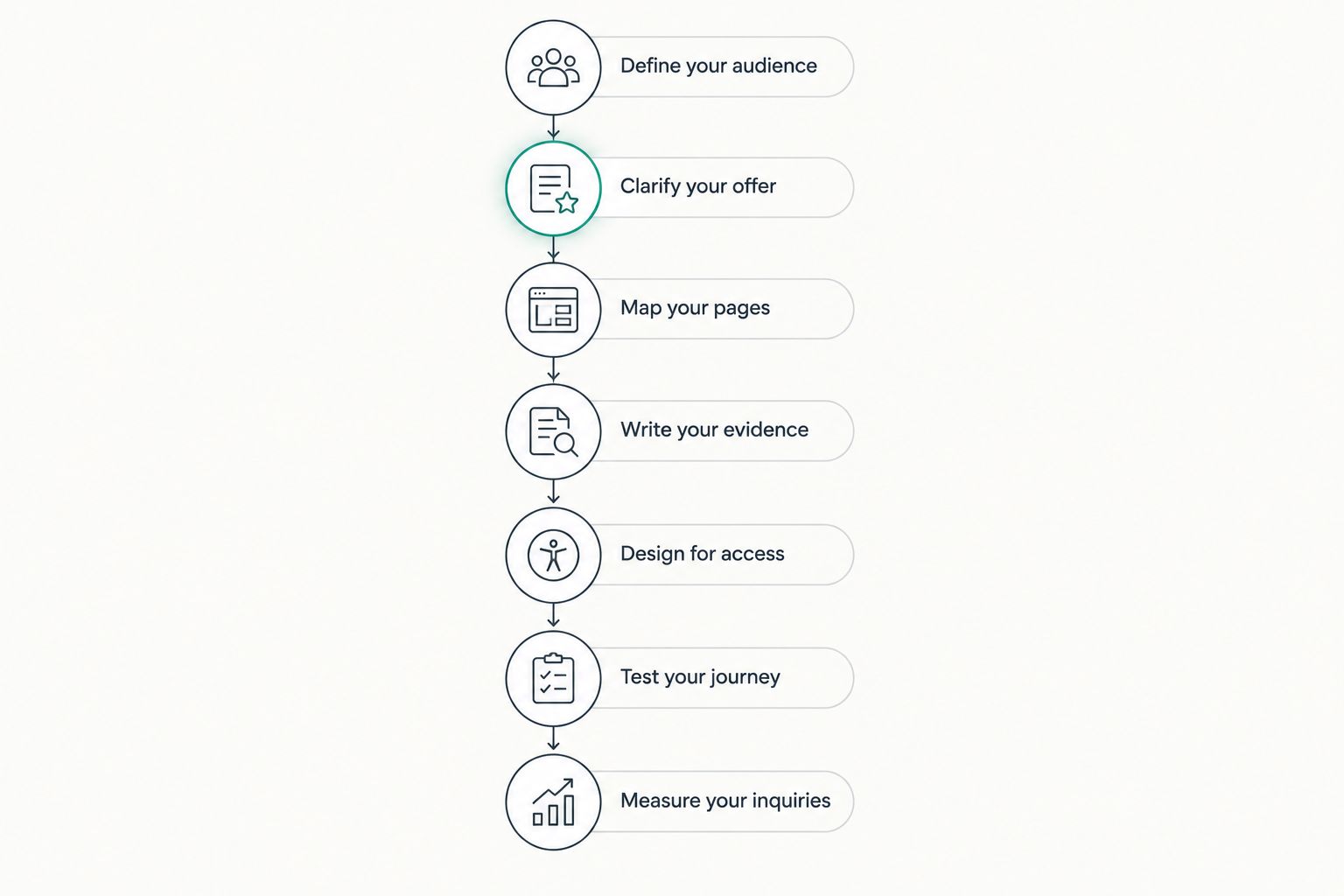
The full design sequence follows the same order: audience first, measurement last. Reversing it creates avoidable rework because page layouts depend on the message they must carry.
Write your evidence
Gather the material that helps someone assess your work: relevant qualifications, an accurate process description, and testimonials you have permission to publish. Start with facts already available in your records. Do not fill gaps with impressive-sounding claims.
Explain qualifications in context. A visitor should understand how your background relates to the support you provide, rather than having to decode a string of abbreviations. Distinguish your personal experience from professional credentials.
Treat testimonials carefully. A client's personal result does not establish that everyone will achieve the same result. Obtain permission for the wording and identifying details, and avoid publishing private health information simply because it makes the story more dramatic.
- Verify credential names before publishing them.
- Explain the relevance of your training to your coaching.
- Get permission for testimonials and identifying information.
- Keep personal experience separate from professional qualifications.
- Remove unsupported health claims from headings and testimonials.
Design for access
Begin with a template's structure, not its sample photography. Check whether it can present your offer, evidence, and inquiry route clearly. A design built around large images needs substantial changes if your service depends on explaining a nuanced process.
Use descriptive headings, readable text, meaningful link labels, and properly labeled form fields. Check contrast and keyboard access rather than assuming that a visually simple page is accessible. Do not claim accessibility compliance without an appropriate assessment.
On mobile, verify that visitors can read your scope statement and reach the next step without fighting overlays or oversized sections. Your 2026 design should make essential information easier to reach, not hide it behind visual effects.
- Check text and button contrast.
- Use descriptive headings in a logical order.
- Label every form field and explain errors clearly.
- Add useful alternative text to informative images.
- Test navigation and forms with a keyboard.
Test your journey
Before publishing, ask someone unfamiliar with your practice to complete 3 tasks: identify whom you serve, explain what your coaching includes, and find the next step. Watch where they hesitate. Do not explain the page while they are testing it.
Then submit your own inquiry form on a phone and a computer. Verify that the message reaches the intended destination and that the confirmation explains what happens next. Only state a response time if you can consistently meet it.
Keep general inquiry forms focused on contact details and fit. Detailed medical histories belong outside a basic marketing form. If your intake involves sensitive information, get qualified guidance on the collection process and applicable privacy requirements.
- Test the homepage without giving the tester background.
- Submit every inquiry form on mobile and desktop.
- Verify confirmation messages and notification delivery.
- Remove unnecessary sensitive questions from public forms.
- Check links, buttons, and visible contact information.
Measure your inquiries
Start with a spreadsheet if you do not have a reporting system. Record the inquiry date, stated need, source when known, and whether the inquiry matches your offer. Keep private health details out of a marketing performance sheet.
Use an initial 30-day review window as an operating routine, not as a promise of results. Read inquiry quality alongside website activity. A page attracting visitors with needs outside your scope requires a different response from a page that attracts suitable visitors but leaves the next step unclear.
For the rest of 2026, connect changes to an observed problem. Rewrite an unclear offer before changing the entire visual design. Track one change at a time where practical so your records remain useful.
- Record inquiry sources without guessing unknown ones.
- Separate suitable inquiries from out-of-scope requests.
- Review questions that visitors repeatedly ask.
- Compare page activity with completed inquiries.
- Log the date and purpose of each website change.
Compare website design options for your practice
Choose an approach based on the work you need help with. Building the pages, clarifying the offer, and reviewing professional claims are different responsibilities. A website designer does not automatically replace a copywriter or qualified compliance adviser.
The table separates those responsibilities so you can compare proposals against the same brief. Ask each provider what is included, what you must supply, and who handles revisions.
| Option | Best for | Main advantage | Key limitation |
|---|---|---|---|
| DIY website template | Coaches with a clear offer who want to build their own pages | You control the writing and layout directly | You remain responsible for messaging, testing, and maintenance |
| Independent website designer | Coaches who have content ready and need design execution | You can delegate page construction | Branding and content work must be confirmed separately |
| Bridgetbakerbranding | Coaches seeking branding, Squarespace website design, and visibility coaching | The agency offers those connected services | It is not a substitute for clinical, legal, or privacy advice |
| Phased DIY with specialist help | Coaches who want to retain some tasks and delegate others | You can assign help to specific problems | You must coordinate the brief and responsibilities |
The best option is the one that addresses your actual bottleneck. If your offer remains unclear, changing templates will not write it for you. If your message is already strong, a focused design project avoids reopening decisions unnecessarily.
Explore support for your coaching website
Review branding, Squarespace website design, and visibility coaching from Bridgetbakerbranding.
Common mistakes health and wellness coaches make
Make the homepage sound like a medical service
Clinical language, treatment promises, or ambiguous credentials can misrepresent coaching. Describe your actual role and qualifications. If you also provide another professional service, distinguish its scope from the coaching offer instead of blending both into one promise.
Lead with a personal recovery story
Your experience can explain why the work matters to you, but it does not automatically explain the service. Put the visitor's needs and your coaching process first. Use personal background where it adds relevant context, without implying that your experience predicts client results.
Collect sensitive details before establishing fit
A long form asking about diagnoses, medications, or private history creates a data-handling responsibility before the visitor understands your service. Keep the initial inquiry focused. Determine what information is necessary, when to collect it, and how to handle it with appropriate advice.
Publish wellness articles without an inquiry path
Educational content and service information do different jobs. Answer the article's question, then explain the relevant coaching context and next step. Do not turn every informational page into a sales pitch, but do not leave interested readers unable to understand your offer either.
Redesign without diagnosing the problem
Before commissioning a 2026 redesign, identify whether the issue is unclear positioning, weak evidence, a broken form, or a confusing mobile layout. Write a brief around that problem. A new visual style is not a diagnosis.
FAQ
What's the best website design approach for a health and wellness coach?
The best approach starts with a clear audience, an accurate coaching offer, and a straightforward inquiry route. Choose DIY or professional support according to which writing, design, and testing tasks you can handle yourself.
Is Squarespace a good choice for a coaching website?
Squarespace is an option to evaluate against your coaching website's requirements. Check the page structure, forms, integrations, and maintenance work you need before choosing a platform.
Do I need a separate page for every coaching service?
Create separate pages when the services require meaningfully different explanations or serve different client needs. Do not split one offer into several thin pages simply to increase the page count.
Can I use client health results in testimonials?
Publish client testimonials only with permission and without implying that individual results are guaranteed. Review sensitive information and health claims carefully, and obtain qualified advice when the wording raises professional or legal questions.
What should my coaching inquiry form ask?
A general coaching inquiry form should ask for contact details and enough information to assess initial fit. Avoid requesting detailed medical histories through a basic website form.
Should I hire a designer before writing my website copy?
Clarify your audience and offer before committing to page layouts. A designer can then build around the information visitors need rather than forcing unfinished messaging into a template.
How do I know whether my coaching website is working?
Check whether visitors understand your offer, can complete the inquiry process, and submit suitable inquiries. Use inquiry quality alongside website activity rather than treating traffic alone as success.
One last thing
Test the sentence directly above your inquiry button. It should explain what the visitor is requesting and what happens next. If that sentence is unclear, the button label alone cannot fix the decision.
Before your next design change, write that explanation in plain language. It gives the rest of the page a concrete destination.