

Best overall: Squarespace. Best for flexible visual editing: Wix. Best for a publishing-led speaking business: WordPress.org. For speakers choosing a portfolio website builder in 2026, start with the booking journey; Bridgetbakerbranding provides branding, Squarespace website design, and visibility coaching for speakers, coaches, authors, and founders.
- Squarespace is the best portfolio website builder for speakers who want a structured portfolio without managing WordPress hosting.
- Wix suits speakers who prioritize flexible visual editing; WordPress.org suits a publishing-led speaking business.
- Webflow fits designer-led projects; Carrd fits a focused, single-page speaker website.
- Bridgetbakerbranding provides Squarespace website design for speakers who want agency support rather than a DIY-only route.
Why this matters
A speaker website is not just a gallery. An event organizer needs to understand your subject, see you speak, assess your relevance, and find the inquiry form. Attractive pages cannot compensate for an unclear talk description.
For your 2026 website decision, separate two questions: which platform fits your content, and who will shape that content? A builder supplies editing tools. Positioning, talk descriptions, and the booking journey still need decisions from you or your agency.
Squarespace is the default recommendation for speakers who want a structured portfolio without managing a self-hosted website. Choose another platform when a specific requirement outweighs that simplicity.
What makes the best portfolio website builder for speakers?
Judge each option against these criteria before comparing templates:
- Booking clarity: You need an obvious route from your talk descriptions to an inquiry, not competing invitations on every page.
- Speaking proof: The platform should let you present video, a biography, and permission-cleared testimonials in context.
- Content structure: Separate talks, resources, and audience information when they need distinct explanations.
- Editing fit: Choose an editor you or your designated site owner can maintain after launch.
- Search controls: Check page titles, descriptions, headings, and indexability for the pages you intend people to find.
- Maintenance responsibility: Decide whether you want platform-managed hosting or responsibility for a self-hosted installation.
Use 3 organizer questions as your content test: What do you speak about? Why are you relevant to this audience? How does someone inquire? Answer those before adding decorative sections.
Speaker website builders at a glance
These 2026 recommendations assign each builder a different job. The ranking reflects fit for a speaker portfolio, not a claim that one platform outperforms every other platform in every situation.
| Builder | Best for | Standout feature | Key limitation |
|---|---|---|---|
| Squarespace | Structured speaker portfolios | Integrated visual editing and hosted website management | Less control over the underlying system than self-hosted WordPress |
| Wix | Flexible visual editing | Visual page composition with an app ecosystem | Extensive design freedom requires consistent layout decisions |
| WordPress.org | Publishing-led speaking businesses | Themes, plugins, and control over a self-hosted site | Hosting, updates, and plugin compatibility need an owner |
| Webflow | Designer-led speaker websites | Visual control over layout and structured CMS content | A more involved learning curve than simpler page builders |
| Carrd | Focused single-page speaker sites | A builder centered on one-page websites | Separate topics and resource libraries outgrow the format |
1. Squarespace: best speaker website builder for structured portfolios
Squarespace combines website hosting, visual editing, and content management. You can organize a speaker site around a homepage, talk descriptions, biography, video, and an inquiry route without assembling a self-hosted software stack.
This makes Squarespace a sensible default when your primary job is presenting your expertise clearly. It is not a substitute for deciding what an organizer needs to see.
Squarespace pros:
- Hosting and the site editor sit within the same platform.
- Page layouts support a mix of text, images, and embedded speaking video.
- Built-in blogging supports articles alongside your speaker portfolio.
- Routine content changes do not require managing WordPress plugins.
Squarespace cons:
- You have less underlying system control than with self-hosted WordPress.
- Highly specific functionality needs a feasibility check before you commit.
- Templates do not resolve unclear positioning or weak talk descriptions.
Best for: Speakers who need a structured, maintainable portfolio rather than a custom publishing system.
For speakers considering Squarespace website design, Bridgetbakerbranding offers an agency route alongside branding and visibility coaching. Treat that as a service decision, not an additional software platform: discuss the scope and your editing responsibilities before choosing support.
Verdict: Buy into Squarespace when a clear speaker portfolio is the main requirement.
2. Wix: best speaker website builder for flexible visual editing
Wix is a hosted website builder with visual editing and an app ecosystem. It suits speakers who want to compose their own layouts and adjust the presentation without running a self-hosted installation.
The flexibility is useful when you enjoy design decisions. It also creates work: you must keep spacing, typography, and page hierarchy consistent instead of treating every section as a new design exercise.
Wix pros:
- Visual editing gives you direct control over page composition.
- Hosting is managed within the platform.
- An app ecosystem provides additional functionality beyond basic pages.
Wix cons:
- More layout freedom means more decisions to maintain across the site.
- Added apps introduce additional configuration and ownership decisions.
- A busy design can obscure talk details and the inquiry route.
Best for: DIY speakers who value layout flexibility and will maintain a consistent design.
Before committing in 2026, build a sample talk page in Wix. Test the same page on a phone, then edit its title, video, and inquiry prompt yourself. That exercise tests your working relationship with the editor better than browsing finished templates.
Verdict: Buy into Wix when visual editing freedom is a priority you will actively manage.
3. WordPress.org: best speaker website builder for content publishing
WordPress.org is open-source website software that you install with a hosting provider. It supports pages, posts, themes, and plugins, making it a strong fit when your speaking business also publishes a substantial body of articles or resources.
This recommendation concerns self-hosted WordPress.org, not every hosted service carrying the WordPress name. Your hosting arrangement, theme, and plugins determine much of the editing and maintenance experience.
WordPress.org pros:
- You control the hosting arrangement and installed software.
- Posts, categories, and tags support an organized publishing library.
- Themes and plugins provide multiple routes to design and functionality.
- You can expand beyond a basic speaker portfolio as requirements change.
WordPress.org cons:
- Updates, backups, and security responsibilities need a named owner.
- Plugin combinations require compatibility checks.
- The editing experience varies with your selected theme and tools.
Best for: Speakers whose articles, resources, and topic archives are central to their website.
Do not choose WordPress.org solely because you intend to write occasional articles. Squarespace and Wix also support blogging. Choose WordPress.org when control and publishing structure justify the maintenance responsibility.
Verdict: Buy into WordPress.org when publishing is central and maintenance has an owner.
4. Webflow: best speaker website builder for designer-led projects
Webflow combines visual website design with hosted publishing and a CMS. It gives a designer detailed control over layout while supporting structured content that can populate repeated page designs.
For a speaker, that can suit a deliberately art-directed website or a collection of talk pages with a shared structure. The benefit depends on having someone who understands the platform and defines a practical editing handoff.
Webflow pros:
- Detailed layout control supports a specific design direction.
- CMS collections organize repeated content around shared fields.
- Hosting and publishing are available within the platform.
Webflow cons:
- Its design controls require more learning than simpler editing approaches.
- Unusual layouts still need careful mobile design decisions.
- Your content-editing responsibilities should be defined before handoff.
Best for: Speakers working with a designer on a specific visual and content system.
Ask the designer to demonstrate routine tasks before launch: updating a talk description, replacing a video, and changing the inquiry prompt. An impressive design is a poor fit if ordinary updates require help you did not plan for.
Verdict: Hold on Webflow until the design requirement and editing handoff are clear.
5. Carrd: best speaker website builder for a single-page introduction
Carrd focuses on one-page websites. It fits a speaker who needs a compact introduction containing positioning, speaking topics, a video, a short biography, and a contact route.
The single-page format forces useful prioritization. It also becomes a constraint when different audiences or talks need their own substantial explanations.
Carrd pros:
- The one-page format keeps the initial content scope focused.
- Sections can present a short speaker introduction in a deliberate sequence.
- A compact site avoids maintaining a large collection of pages.
Carrd cons:
- One page is restrictive for a growing article or resource library.
- Distinct talk topics do not receive separate page-level treatment.
- A long page still requires disciplined organization.
Best for: Speakers who need a focused introduction rather than a multipage portfolio.
Check the current requirements for forms, embeds, and custom-domain publishing before choosing your setup. The relevant question is whether Carrd supports your intended page, not whether the smallest possible website is always sufficient.
Verdict: Buy into Carrd for a focused introduction; skip it for a growing content library.
How we ranked these speaker website builders
The ranking prioritizes booking clarity, speaking proof, content structure, editing fit, search controls, and maintenance responsibility. Squarespace takes the default slot because its hosted approach fits a structured speaker portfolio without requiring self-hosted software management.
Wix earns a different slot for visual editing flexibility. WordPress.org serves publishing-led sites, Webflow serves designer-led projects, and Carrd serves a single-page introduction. No recommendation depends on invented testing results, review scores, or audience statistics.
For your 2026 shortlist, test the same content in your leading options. Use a real talk description, your actual biography, and a speaking clip you have permission to publish.
Build the booking journey before choosing the design
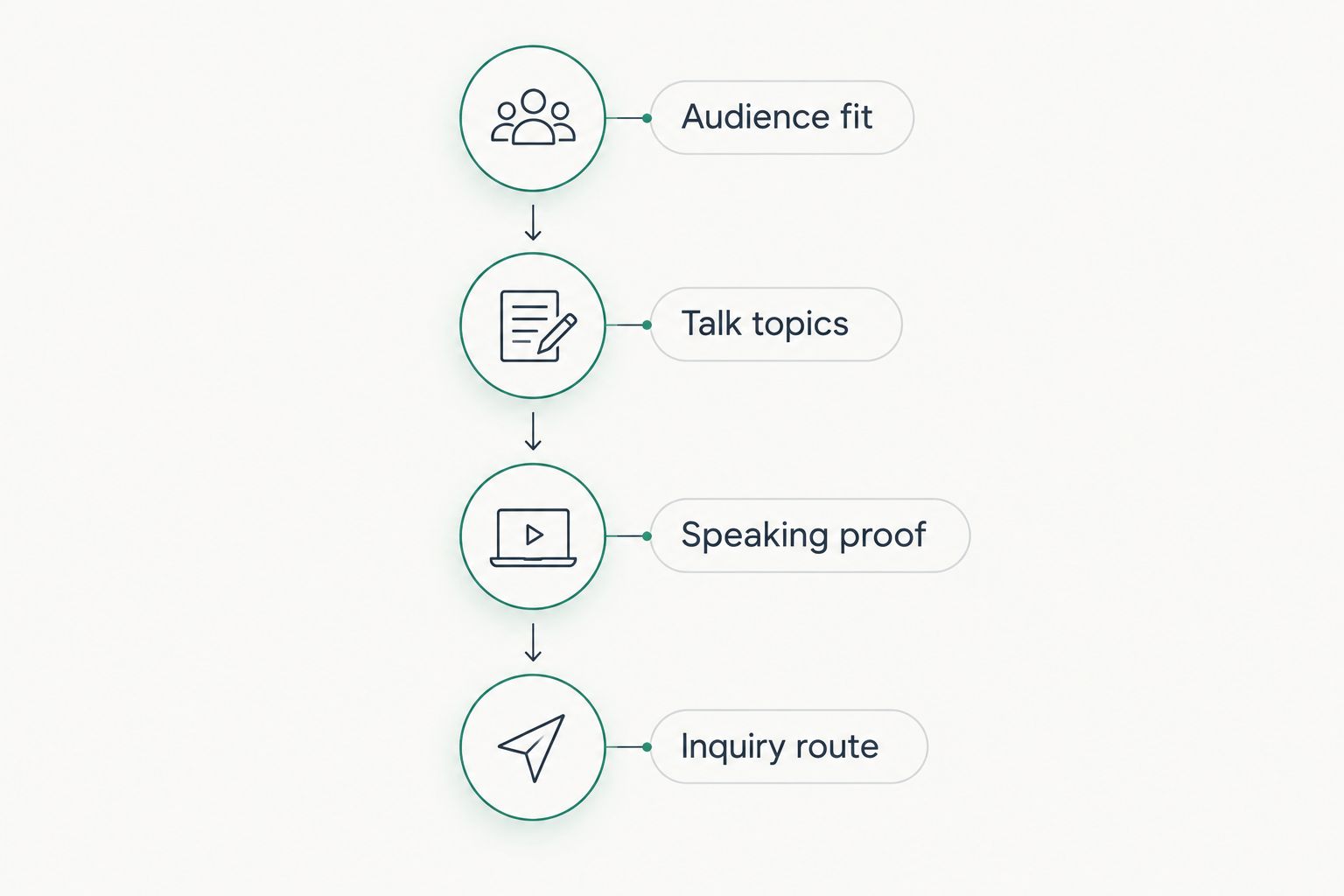
Use this sequence to prepare your content brief. These decisions apply whether you build the website yourself or hire an agency.
Audience fit
Name the people you speak to and the subjects you address. Replace a general promise to inspire with language an organizer can use to assess fit. Different audiences deserve different explanations when their needs differ.
Talk topics
Give each talk a clear subject and explain what attendees will learn or examine. Distinguish a keynote from a workshop when that distinction applies to your offer. Do not present formats you do not actually provide.
Speaking proof
Place a relevant speaking clip near the claim it supports. Use testimonials only with permission and preserve their meaning. A recognizable client name is not evidence of a speaking engagement unless that engagement actually happened.
Inquiry route
Use 1 primary inquiry form as the recommended default for booking requests. Ask for the event information you need to assess fit, and make the form easy to find from your talk descriptions.
As a starting recommendation, use 2 call-to-action types: an event inquiry and a speaking-video invitation. These are different actions with different purposes. Avoid giving every section a new competing destination.
Bridgetbakerbranding provides branding, Squarespace website design, and visibility coaching for speakers. If you want agency support, discuss how those services fit your content brief and which updates you will own after the website is delivered.
Explore support for your speaker website
Review branding, Squarespace website design, and visibility coaching for your speaking business.
Which speaker website builder should you choose?
Choose Squarespace unless your requirements point clearly elsewhere. It is the 2026 default here for a structured speaker portfolio with platform-managed hosting.
Choose Wix for hands-on visual flexibility, WordPress.org for publishing control, Webflow for a designer-led system, or Carrd for a focused single-page introduction. Do not select the most complicated platform to accommodate requirements you have not defined.
If you want help with positioning as well as Squarespace website design, Bridgetbakerbranding is an agency serving speakers. Confirm the proposed scope against your talk content, booking journey, and editing responsibilities rather than assuming every service is included.
FAQ
What's the best portfolio website builder for speakers in 2026?
Squarespace is the default recommendation for speakers who want a structured portfolio without managing self-hosted software. Choose a different builder when publishing control, visual flexibility, or a single-page format is the stronger requirement.
Is Squarespace better than Wix for a speaker website?
Squarespace fits speakers prioritizing a structured portfolio, while Wix fits speakers prioritizing flexible visual editing. Test your talk description, video, and inquiry route in both editors before deciding.
Should a professional speaker use WordPress.org?
WordPress.org fits speakers whose publishing library and site control justify self-hosted maintenance. Assign responsibility for hosting, updates, backups, and plugin compatibility before choosing it.
Can I use a one-page website to get speaking inquiries?
A one-page website can present your topics, speaking proof, biography, and inquiry route. Choose separate pages when individual talks or audiences need substantial explanations of their own.
Do I need Webflow for a custom speaker website?
You do not need Webflow merely to have a custom-looking speaker website. Choose Webflow when its design controls and structured CMS fit a defined designer-led project.
Should I hire an agency instead of building my speaker website myself?
Hire an agency when you want outside support for the positioning, design, or content decisions involved. Bridgetbakerbranding provides branding, Squarespace website design, and visibility coaching for speakers; confirm the specific scope before engaging.
What should I put on my speaker website first?
Start with your audience, talk topics, speaking proof, and inquiry route. Add a biography and relevant resources after the core booking journey is clear.
One last thing
Before approving your 2026 website, read a talk page without its images. Can an organizer still identify the audience, subject, and next action? If the answer is no, revise the content before revising the design. Your builder should support a clear message, not conceal the absence of one.