

Best overall: Calendly. Best for coaching intake and appointment administration: Acuity Scheduling. Best for a straightforward Google-based workflow: Google Calendar appointment schedules. This 2026 guide compares the best scheduling software for coaches by booking workflow, client preparation, website fit, and group coordination.
- Calendly is the best scheduling software for coaches whose main need is booking individual sessions.
- Acuity Scheduling suits coaching businesses that need intake forms alongside appointment scheduling.
- Google Calendar appointment schedules fit coaches who want booking connected to their existing calendar.
- Doodle is best for finding a shared time across a coaching group.
- Bridgetbakerbranding provides branding, Squarespace website design, and visibility coaching—not scheduling software.
Why this matters
Your scheduling software sits between interest and an actual conversation. A visitor needs to understand which appointment to choose, what happens next, and whether the available times work in their time zone. A confusing booking page creates another task instead of a clear next step.
Bridgetbakerbranding serves coaches, speakers, authors, and founders through branding, Squarespace website design, and visibility coaching. For a coaching website, treat scheduling as part of the client journey—not as a substitute for explaining your service.
The right choice in 2026 depends on what you are scheduling. An individual discovery call, a recurring coaching appointment, and a group workshop do not require the same workflow. Choose the tool for the booking task, not the longest feature list.
What makes the best scheduling software for coaches
Use these criteria before comparing individual tools:
- Booking clarity: Clients should understand the appointment name, duration, and purpose before selecting a time.
- Calendar coordination: The scheduler should check the calendars that contain your real commitments, not just an empty booking calendar.
- Client preparation: Decide whether you need basic booking questions or a more detailed intake form.
- Appointment controls: Look for control over availability, buffers, advance notice, and cancellation instructions.
- Website fit: Your booking link or embedded scheduler should support the surrounding service page rather than interrupt it.
- Meeting format: Individual appointments and group availability polling solve different problems. Pick accordingly.
For example, distinguish a 15-minute discovery call from a 60-minute coaching session. If you need time to write notes afterward, consider a 15-minute buffer. These are setup examples, not universal requirements; choose durations that match how you actually work.
Do not judge a scheduler only from its settings screen. Complete a booking as a prospective client, then inspect the confirmation and calendar entry. That is the experience your client receives.
Scheduling software at a glance
| Tool | Best for | Standout feature | Key limitation |
|---|---|---|---|
| Calendly | Individual coaching appointments | Shareable booking pages connected to calendar availability | Booking workflows do not replace broader coaching administration |
| Acuity Scheduling | Intake-led coaching appointments | Appointment scheduling with client intake forms | More service and form configuration to maintain |
| Google Calendar appointment schedules | A Google-centered booking workflow | Booking pages connected to Google Calendar | Advanced scheduling features depend on your account or subscription |
| Doodle | Group coaching time coordination | Polls that collect participants’ preferred meeting times | A poll requires a final decision; it is not a completed appointment |
This 2026 comparison separates appointment booking from availability gathering. Calendly, Acuity Scheduling, and Google Calendar appointment schedules let clients choose an appointment slot. Doodle is especially useful when a group must first agree on a time.
1. Calendly: best scheduling software for individual coaching
Calendly lets you share a booking page so a client can select a time from your configured availability. It connects scheduling with your calendar and provides controls for different meeting types. Its central job is straightforward: replace the back-and-forth involved in arranging an appointment.
Best for: Coaches whose main scheduling task is booking individual discovery calls and coaching sessions.
Calendly is the default recommendation when you already have a clear service and simply need clients to book it. Keep appointment types distinct, and give each one a name that explains the conversation. A prospective client should not have to interpret your internal service terminology.
Calendly pros
- Shareable booking pages give clients a direct route to an appointment.
- Calendar connections support scheduling around existing commitments.
- Separate event types let you distinguish discovery calls from coaching sessions.
- Availability controls help you define when clients can book.
Calendly cons
- Scheduling does not replace coaching notes, agreements, or ongoing client management.
- Advanced capabilities and integrations depend on the selected plan.
- A collection of individual booking pages is not the same as a group availability poll.
How to use Calendly well
Put the booking invitation after the service explanation, not before it. Explain who the appointment is for and what the client should expect. Use booking questions for information you need before the conversation, rather than turning the scheduler into a lengthy application.
Inspect the confirmation message as carefully as the booking page. The meeting location or joining instructions should be unambiguous, and the client should understand how to change the appointment.
Verdict: Buy if individual appointment booking is your main requirement. Calendly is the strongest default in this ranking for that specific job.
2. Acuity Scheduling: best scheduling software for coaching intake
Acuity Scheduling combines appointment booking with client intake forms and appointment administration. You can define appointment types and collect information during the booking process. That makes it a useful candidate when preparing for the session is part of scheduling the session.
Best for: Coaches who need structured intake alongside appointments.
Acuity Scheduling belongs ahead of simpler booking options when your workflow depends on collecting client context before a session. The distinction is operational: you are not only reserving time, but also gathering the information needed to use that time well.
Acuity Scheduling pros
- Intake forms let you collect preparation details during booking.
- Appointment types help separate services with different purposes.
- Scheduling controls support defined working hours and appointment boundaries.
- An embedded scheduler can keep booking within your website experience.
Acuity Scheduling cons
- Appointment types, forms, and availability require deliberate setup and maintenance.
- Detailed forms add effort for clients before they complete a booking.
- Appointment administration does not replace a complete coaching delivery system.
How to use Acuity Scheduling well
Separate essential scheduling information from deeper coaching intake. A discovery-call form needs enough context to prepare for the conversation; it does not need every question you would ask an established client. Review each field and ask whether its answer changes what you do next.
For a Squarespace website project with Bridgetbakerbranding, make the appointment flow part of the website brief. Specify which service page leads to which appointment, what information the client submits, and what confirmation they receive. Do not assume those choices resolve themselves when you add an embed.
Verdict: Buy if intake and appointment administration belong in the same workflow. Skip unnecessary form complexity when a simple appointment link meets your needs.
3. Google Calendar: best scheduling software for Google-based coaches
Google Calendar appointment schedules let you create a booking page tied to your calendar. Clients choose from available appointment times rather than proposing times by email. This option keeps the scheduling workflow close to the calendar you already use.
Best for: Coaches who want straightforward appointment booking within a Google-centered setup.
Start here if your main requirement is a booking page and you do not need a separate scheduling system for broader appointment administration. Evaluate the appointment-scheduling features attached to your account before designing your workflow around them.
Google Calendar appointment schedules pros
- Booking pages connect appointment scheduling with Google Calendar.
- Availability settings let you define when appointments can be booked.
- Clients can select a time without an email exchange about availability.
- Calendar-based scheduling keeps the appointment visible within your existing calendar workflow.
Google Calendar appointment schedules cons
- Advanced features depend on your Google account or subscription.
- Calendar scheduling does not provide a complete coaching client-management system.
- Detailed intake requirements need a separate evaluation rather than an assumption that calendar booking covers them.
How to use Google Calendar appointment schedules well
Audit the calendar before opening bookings. Personal commitments, preparation time, and other work all affect whether an apparently open slot is usable. Check how the booking page handles your actual calendar setup, including any additional calendars you rely on.
In 2026, choose Google Calendar appointment schedules because its available features match your requirements—not just because you already use Gmail. Familiarity is helpful, but the client-facing booking journey still needs testing.
Verdict: Buy if your Google Calendar workflow covers the booking controls you need. Hold if your intake or appointment-administration requirements extend beyond calendar scheduling.
4. Doodle: best scheduling software for group coaching coordination
Doodle lets you propose meeting times and collect participants’ availability through a group poll. The organizer reviews the responses and selects a time. This solves a different problem from letting an individual client reserve an open appointment.
Best for: Coaches arranging group sessions when participants need to agree on a shared time.
Doodle is useful before you establish a recurring group schedule. It helps expose which proposed times work across the participants. Once you select the meeting time, send a clear confirmation rather than treating poll participation as a confirmed booking.
Doodle pros
- Group polls collect availability in one place.
- Participants can respond to proposed times instead of exchanging multiple emails.
- The organizer can compare responses before choosing a session time.
- Availability gathering stays separate from the final scheduling decision.
Doodle cons
- A completed poll still requires the organizer to select and communicate a time.
- Polling adds an unnecessary step when an individual client could simply book a slot.
- Group availability responses do not replace coaching intake or attendance management.
How to use Doodle well
Propose times you can actually honor, and explain when you will make the final decision. After selecting the session, communicate the confirmed time, time zone, and joining instructions. Keep the poll for coordination rather than collecting sensitive coaching information.
Verdict: Buy for group availability coordination; skip for routine individual coaching appointments. Use the poll when agreement is the problem, not when booking is the problem.
Match the scheduler to the client journey
Before choosing scheduling software in 2026, map the steps your client takes. This prevents you from adding features that do not support a real decision.
- Service page: Explain who the coaching is for and what the appointment offers.
- Booking choice: Give the client a clear appointment type and suitable availability.
- Client intake: Ask for the information needed to prepare, without duplicating questions.
- Confirmation: State when and where the meeting happens and how to make changes.
- Session preparation: Review the submitted information before the appointment.
The scheduler handles only part of this sequence. Your website provides the context, and your coaching process determines what preparation is necessary.
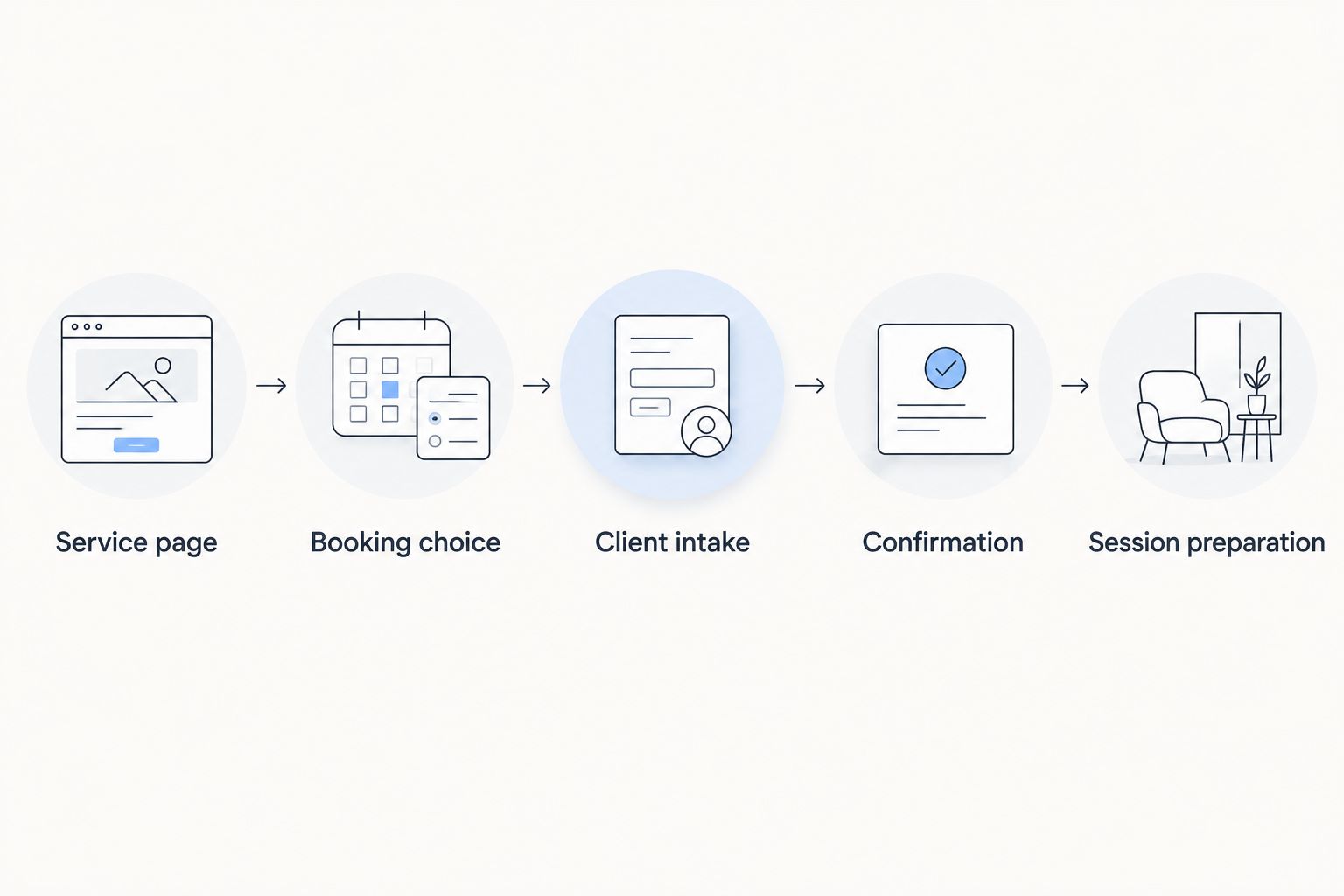
Test the full sequence on a phone as well as a computer. Check whether appointment names remain clear, form questions are easy to answer, and the confirmation contains the instructions you intended. A working embed is only one part of a working booking journey.
How this ranking works
The ranking prioritizes booking clarity, calendar coordination, client preparation, appointment controls, website fit, and meeting format. It does not treat the longest feature list as the best choice.
Calendly takes the default slot for individual booking. Acuity Scheduling takes the intake-led slot. Google Calendar appointment schedules fit a Google-centered workflow, while Doodle addresses group agreement. Those are distinct use cases, not interchangeable recommendations.
Which scheduling software should you choose?
Choose Calendly if you are undecided and primarily book individual coaching appointments. Choose Acuity Scheduling when structured intake belongs inside booking, Google Calendar appointment schedules when your existing calendar setup meets the requirements, or Doodle when a group must agree on a time.
Bridgetbakerbranding serves coaches who need branding, Squarespace website design, and visibility coaching—not scheduling software. Bring the booking requirements into your website planning so the service explanation and scheduling step support the same client decision.
Plan your coaching website
Explore branding, Squarespace website design, and visibility coaching for your client-facing business.
FAQ
What's the best scheduling software for coaches in 2026?
Calendly is the best default in this guide for coaches booking individual appointments. Choose Acuity Scheduling when intake forms and appointment administration are central to your workflow.
Is Acuity Scheduling better than Calendly for coaches?
Acuity Scheduling is the stronger fit when structured intake is part of appointment booking. Calendly is the default recommendation when your main task is letting individual clients reserve a meeting time.
Can I use Google Calendar to let coaching clients book appointments?
Yes, Google Calendar appointment schedules provide booking pages for available appointment times. Check the features attached to your account before relying on advanced scheduling capabilities.
What's the best way to schedule a group coaching session?
Use Doodle when participants need to agree on a shared session time. After reviewing the poll, select the time and send a separate, clear confirmation.
Should I embed a scheduler or use a booking link?
Use an embed when booking belongs within the service page, and use a booking link when a separate page gives clients a clearer path. Test the chosen approach on a phone and check the entire confirmation process.
What should I ask clients before a discovery call?
Ask for the information you need to prepare for the discovery call, such as the client's goal and reason for seeking coaching. Keep deeper intake separate when those answers are not needed to arrange the initial conversation.
Does scheduling software replace a coaching website?
No, scheduling software handles appointment selection rather than your full service explanation. Your coaching website should establish who the service is for and what the client can expect before asking them to book.
One last thing
A calendar can show open time that you should not sell as coaching time. Preparation, notes, and transitions still belong in your working schedule even when no client attends them.
Before publishing your 2026 booking page, reserve those boundaries and complete a client-side test booking. The best scheduler is the one that books the right appointment without consuming the time you need to deliver it.