

Best overall: Google Forms. Best for website-ready testimonials: Testimonial.to. Best for guided video responses: VideoAsk. Best for collaborative client stories: Google Docs. This 2026 guide compares the best testimonial collection tools for coaches by collection friction, editorial control, and publishing needs; Bridgetbakerbranding serves coaches through branding, Squarespace website design, and visibility coaching.
- Google Forms leads the best testimonial collection tools for coaches when straightforward written feedback is enough.
- Testimonial.to suits coaches who want testimonial collection and website display in the same workflow.
- VideoAsk fits guided video testimonials; Google Docs fits collaboratively edited client stories.
- Bridgetbakerbranding serves coaches through branding and Squarespace website design, not testimonial collection software.
Why this matters
A testimonial request should help clients describe their experience, not make them write your sales copy. Ask for the situation they brought to coaching, what changed, and what another prospective client should understand.
The collection tool handles the response. You still decide whether the statement is accurate, whether you have permission to publish it, and where it belongs on your website.
For a coach, those decisions matter more than collecting praise in every available format. A specific written statement can explain your work better than a polished video that never names the client's problem.
Choose the simplest tool that captures the kind of evidence your next buyer needs. Add video, display widgets, or collaborative editing only when those features solve a defined problem.
What makes the best testimonial collection tools for coaches
Use these criteria to make your 2026 shortlist. They separate a useful collection system from another account you have to maintain.
- Simple requests: Clients should understand what you want without reading a long explanation or learning an unfamiliar workflow.
- Relevant formats: Written responses suit concise website quotes. Video suits spoken accounts. Longer documents suit detailed client stories.
- Client control: Your request should explain the intended use and give clients room to decline public attribution.
- Editorial control: You need a way to review wording, preserve context, and seek approval for substantive edits.
- Publishing fit: Decide whether you need a display widget or simply approved text to place within your existing website.
- Easy updates: You should be able to identify the client, their permission, and the published version without reconstructing an email thread.
Do not confuse collection features with consent management. A checkbox can record an answer, but the wording of your request determines what that answer actually authorizes.
Testimonial collection tools at a glance for 2026
| Tool | Best for | Standout feature | Key limitation |
|---|---|---|---|
| Google Forms | Straightforward written feedback | Structured responses with spreadsheet organization | Website publication remains a separate task |
| Testimonial.to | Website-ready testimonial collections | Text and video collection with embeddable displays | Display options do not replace editorial judgment |
| VideoAsk | Guided video responses | Video-led questions with video, audio, or text answers | Recording introduces a different participation burden |
| Google Docs | Collaborative client stories | Shared editing and comments | Not a dedicated collection or display system |
This is a workflow comparison, not a ranking by feature count. The right choice depends on what you want the client to submit and what you need to publish afterward.
1. Google Forms: best testimonial collection tool for written feedback
Google Forms collects answers through a questionnaire and organizes submissions for review. You can use structured questions for context, paragraph fields for the testimonial, and a separate question about publication permission.
For a coach seeking concise written feedback, that is a direct starting point. You do not need a video workflow to learn what the client found useful.
Google Forms pros:
- Keeps the same core questions consistent across client responses.
- Supports paragraph answers for detailed written feedback.
- Connects responses to Google Sheets for organization and review.
- Lets you separate feedback questions from permission questions.
Google Forms cons:
- Does not turn approved responses into a dedicated testimonial display on your website.
- Requires a separate process for reviewing edits and tracking publication.
- A long questionnaire still creates work for the client, regardless of the tool.
Best for: Coaches who want a repeatable written request and are comfortable publishing approved quotes manually.
Start with 3 prompts: the client's starting situation, the useful change, and their advice to someone considering coaching. Keep questions neutral; do not ask clients to confirm a result they never reported.
Use a separate permission field rather than treating submission as approval to publish. Verdict: Buy into Google Forms as the default written-feedback workflow; skip it if an integrated testimonial display is essential.
2. Testimonial.to: best testimonial collection tool for website proof
Testimonial.to is built for collecting text and video testimonials and presenting them through embeddable displays. It connects the request and display stages more directly than a general questionnaire.
That makes it a relevant option when your main problem is maintaining a testimonial collection on your website. It is not a substitute for deciding which statements belong beside a particular coaching offer.
Testimonial.to pros:
- Supports written and video testimonials within a dedicated collection workflow.
- Provides embeddable testimonial displays.
- Keeps collection and presentation within the same product.
- Gives you an alternative to manually assembling every testimonial section.
Testimonial.to cons:
- A testimonial wall can separate evidence from the offer it supports.
- Another embedded component adds a publishing dependency to your website.
- Client permission and the accuracy of edited statements still need attention.
Best for: Coaches who want to collect testimonials and maintain a dedicated website display.
Before choosing a display, decide whether visitors need a collection to browse or a specific quote beside a service description. Those are different jobs. A large collection does not automatically answer a prospective client's immediate concern.
For a Squarespace website, check the current embedding instructions and the requirements of your site setup before committing to a publishing workflow. Verdict: Buy into Testimonial.to when collection and display belong together; hold if manually placed quotes already meet your needs.
3. VideoAsk: best testimonial collection tool for guided video responses
VideoAsk uses video-led questions and supports responses through video, audio, or text. It suits a request where you want clients to hear the question rather than interpret a long written brief.
A guided exchange can give the client a clear starting point. The choice of response format also matters: a client willing to write about coaching is not necessarily willing to appear on camera.
VideoAsk pros:
- Lets you introduce the request through a recorded question.
- Supports video, audio, and text response formats.
- Gives spoken client accounts a defined collection workflow.
- Helps you separate questions instead of asking for an unstructured recording.
VideoAsk cons:
- Recording requires a different level of client comfort than written feedback.
- Reviewing recordings adds work compared with scanning short written answers.
- A video-led form is not itself a finished website testimonial section.
Best for: Coaches whose clients want to explain their experience aloud, with a written alternative available.
Keep your opening request specific. Ask clients to describe their own experience, and avoid scripting their praise. If a response includes sensitive information, obtain approval for the version you intend to publish rather than assuming the entire recording is public material.
Start with 1 invitation that explains the purpose and the response options. Do not send separate requests for every format. Verdict: Buy into VideoAsk for guided spoken feedback; skip video-first collection when your clients prefer writing.
4. Google Docs: best testimonial collection tool for client stories
Google Docs supports shared writing, comments, and revisions. It fits a testimonial that needs context, such as a client story explaining the starting problem, the coaching experience, and the outcome in the client's own terms.
It is a collaborative drafting tool, not a dedicated testimonial platform. Choose it when careful review matters more than collecting responses through a standardized form.
Google Docs pros:
- Lets the client review the wording in context.
- Supports comments for questions and clarification.
- Provides revision history during collaborative editing.
- Accommodates longer narratives without forcing them into short fields.
Google Docs cons:
- Requires more direct coordination than a reusable collection form.
- Does not provide a dedicated testimonial display widget.
- Loose sharing permissions can create access confusion.
Best for: Coaches developing detailed client stories that require collaborative review.
Use headings to distinguish the starting situation, the experience, and the approved quotation. Keep your proposed edits visible so the client can correct meaning, not just grammar.
For a short website quote, propose 2 sentences as an editorial target, not a rule: one describing the problem and one describing the useful change. Let the client reject or expand that version. Verdict: Buy into Google Docs for collaborative stories; skip it as your default high-volume collection workflow.
How we ranked these tools in 2026
The ranking prioritizes a clear request, an appropriate response format, editorial control, and a usable path to publication. Google Forms comes first because a structured written request is the simplest default for the task described here.
Testimonial.to takes the website-display slot. VideoAsk takes guided spoken responses. Google Docs takes collaborative narrative development.
These recommendations distinguish product functions from your responsibilities. No collection tool decides whether a testimonial represents the client's meaning, whether an edit is fair, or whether publication permission covers the intended use.
A collection workflow you can maintain
Request context
Send the request after you have a concrete experience to discuss. Name that experience without suggesting the answer: ask what was useful, what changed, and what the client wants others to understand.
Make the request optional. Feedback should not feel like a condition of receiving your attention or support.
Review meaning
Read the response for specificity before shortening it. Preserve qualifiers and context that affect the meaning.
If you propose a substantive edit, return that version to the client. A clearer sentence is useful only if it remains their account.
Confirm permission
Explain where you intend to publish the testimonial and what attribution you want to use. Separate permission for the words from permission for a name, photograph, or recording.
Do not treat private coaching feedback as public marketing material. Ask explicitly.
Publish proof
Place the approved testimonial beside the service or question it addresses. Keep the original response and approval record together so future updates do not rely on memory.
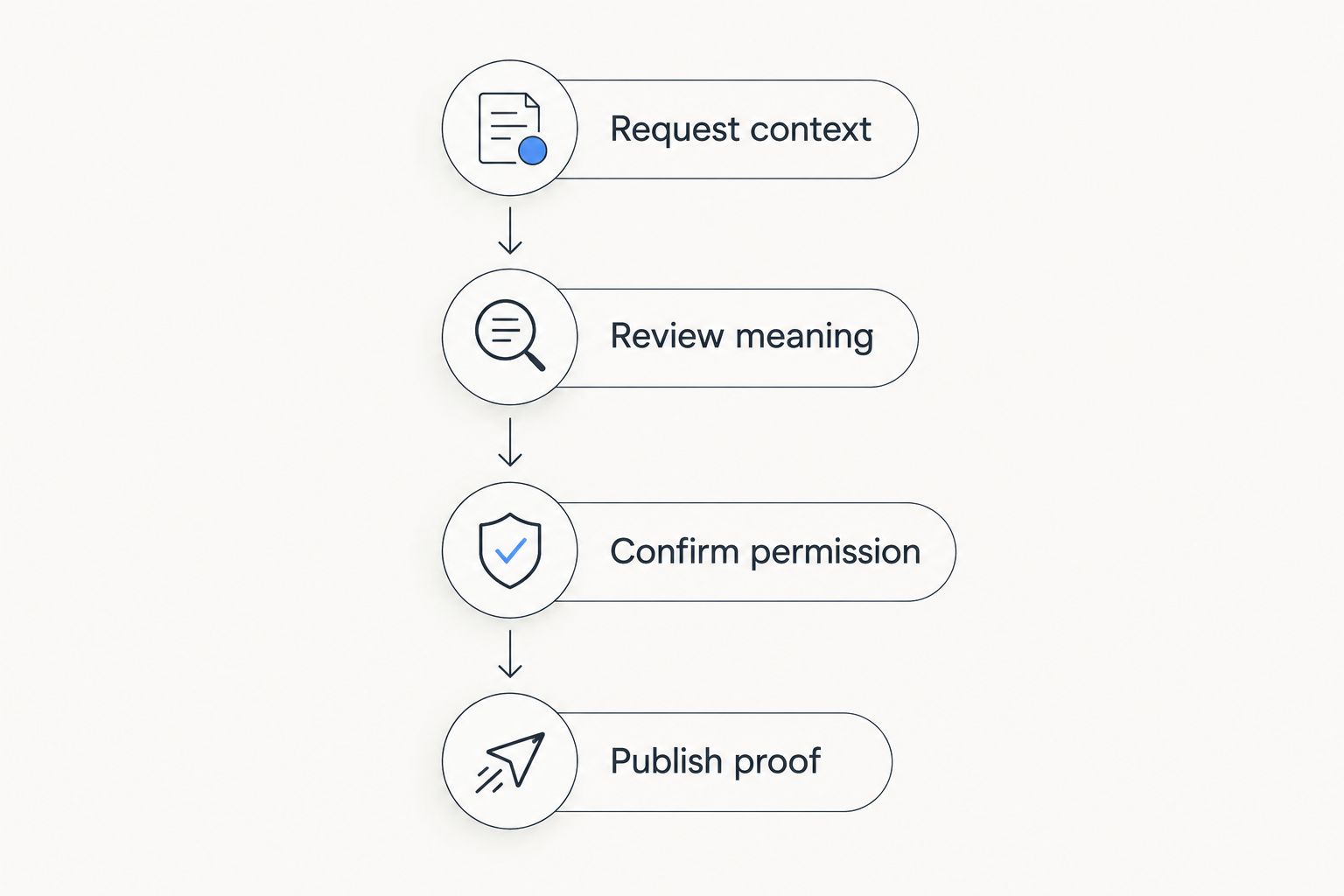
The tool supports this workflow; it does not replace it. An approved statement with clear context is more useful than a collection you cannot confidently publish.
Which testimonial collection tool should you choose in 2026?
Choose Google Forms unless you have a specific reason to collect differently. It fits a straightforward written-feedback request and leaves you in control of the final website wording.
Choose Testimonial.to when maintaining an embedded testimonial collection is the actual requirement. Choose VideoAsk when guided spoken responses suit your clients. Choose Google Docs when the story needs collaborative drafting.
Bridgetbakerbranding is a branding and Squarespace website design agency for coaches, not a testimonial collection platform. Use that distinction when choosing support: collection software handles submissions; website design determines how approved evidence sits alongside your positioning and services.
Before adding a tool, identify the publishing destination and the person responsible for approving each statement. Otherwise, you have built a submission inbox rather than a usable proof library.
FAQ
What's the best testimonial collection tool for coaches?
Google Forms is the best default for coaches collecting straightforward written feedback. Choose Testimonial.to for integrated displays, VideoAsk for guided spoken responses, or Google Docs for collaboratively edited stories.
Is Testimonial.to better than Google Forms for a coaching website?
Testimonial.to is the better fit when you need testimonial collection and an embeddable display together. Google Forms fits structured written requests when you prefer to publish approved quotes manually.
Should coaches collect video or written testimonials?
Collect written testimonials by default unless spoken accounts serve a specific publishing need and clients want to participate. VideoAsk supports video, audio, and text responses, so you can offer alternatives rather than require a recording.
Can I put collected testimonials on my Squarespace website?
You can place approved written testimonials in your Squarespace page content. If you want an embedded display, check the testimonial provider's current instructions and your Squarespace setup requirements before choosing the tool.
What should I ask a coaching client in a testimonial request?
Ask about the starting situation, the useful change, and what another prospective client should understand. Use neutral questions rather than supplying praise or suggesting an outcome the client has not reported.
Do I need permission before publishing a coaching testimonial?
Get explicit permission before using a client's feedback publicly. Explain the intended placement and attribution, and confirm approval for substantive edits or any accompanying photograph or recording.
Can Bridgetbakerbranding collect testimonials as a software platform?
Bridgetbakerbranding is a branding, Squarespace website design, and visibility coaching agency, not testimonial collection software. Choose a collection tool separately from the agency support you need for positioning and website presentation.
One last thing
Your strongest testimonial does not have to be the most enthusiastic one. Choose the statement that answers a real buyer question: who the coaching helped, what the client experienced, or what became clearer.
Before requesting another testimonial, check whether your existing approved feedback belongs closer to the service it explains. A new collection tool cannot fix a quote placed where readers never need it.