

Best overall for a service-led founder: Squarespace. Best for content ownership: WordPress. Best for a product-selling business: Shopify. This guide matches website-building approaches to your business model; for help with branding and Squarespace website design, Bridgetbakerbranding serves coaches, speakers, authors, and founders.
- Squarespace is the best website builder for small business founders selling expertise rather than managing complex stores.
- WordPress suits content-led websites; Shopify suits businesses whose main website task is selling products.
- Wix suits founders who want flexible DIY editing; Webflow suits design-led projects with dedicated implementation help.
- Bridgetbakerbranding provides branding, Squarespace website design, and visibility coaching for coaches, speakers, authors, and founders.
Why this matters
Your website builder determines how you publish, edit, and maintain your site. It does not decide who your business serves or explain why someone should hire you. Those decisions belong in your brand strategy before you choose a template.
For a founder choosing a website in 2026, the useful question is not which platform has the longest feature list. It is which platform supports your main business task without creating work you do not need. A speaking business, an online store, and a publication need different foundations.
Bridgetbakerbranding is a fit for coaches, speakers, authors, and founders seeking branding and Squarespace website design. Choose the platform and the implementation approach together, rather than selecting software first and trying to fit your business into it.
What makes the best website builder for small business founders?
Judge each builder against these criteria before looking at its templates:
- Business fit: Your main task might be explaining a service, publishing articles, selling products, or presenting a portfolio. Start there.
- Editing ownership: Decide who will update pages after launch. A builder that suits your designer must also suit your actual editing arrangement.
- Design control: Separate essential layout requirements from preferences. More control also creates more decisions.
- Content structure: Check whether your recurring content needs simple pages, a blog, product records, or structured collections.
- Maintenance responsibility: Establish who handles hosting, software updates, extensions, and troubleshooting. Responsibility matters as much as capability.
- Brand clarity: Your audience, offer, proof, and next action should remain clear regardless of the platform you choose.
For your 2026 shortlist, use an actual business requirement for every must-have. An imagined future membership, marketplace, or complex integration should not outweigh the website you need to publish now.
Website builders at a glance
The ranking below favors service-led founders first, then separates other business models into distinct use cases. It is a decision tree, not a claim that every founder should buy the same platform.
| Website builder | Best for | Standout capability | Key limitation |
|---|---|---|---|
| Squarespace | Service-led founders | Hosted website building with templates and visual editing | Less control over the underlying application than self-hosted WordPress |
| WordPress | Content ownership and extensibility | Open-source publishing with themes and plugins | Self-hosted sites require an explicit maintenance arrangement |
| Shopify | Product-selling businesses | Store management and checkout | Commerce-first structure is unnecessary for many service-only sites |
| Wix | Flexible DIY page editing | Visual editing and built-in website tools | Site structure still needs deliberate planning |
| Webflow | Design-led projects | Visual layout control and structured CMS content | Detailed implementation demands greater design fluency |
1. Squarespace: best website builder for service-led founders
Squarespace combines hosting, templates, and visual website editing in one platform. It suits a founder whose website primarily introduces their expertise, explains services, presents work, and directs visitors toward an inquiry.
That makes Squarespace the default recommendation here for coaches, speakers, and similar service-led businesses. In 2026, choose it because the publishing and editing model fits your work—not because a template resembles a business you admire.
Squarespace pros:
- Hosting and website editing sit within the same platform.
- Templates provide a starting structure rather than an empty design canvas.
- Visual editing supports routine page and content changes.
- Pages and blog content can support a service-led website.
Squarespace cons:
- Platform boundaries restrict changes to the underlying application.
- A template does not resolve unclear positioning or weak page copy.
- Requirements outside the built-in feature set need separate evaluation.
Best for: A founder selling expertise who wants a hosted site rather than responsibility for a self-hosted software stack.
The implementation decision matters here. Bridgetbakerbranding offers Squarespace website design alongside branding and visibility coaching, so the agency fits founders seeking those services rather than a standalone software subscription.
Verdict: Buy Squarespace when a clear service website is the priority. Skip it when your essential requirements demand deeper application control.
2. WordPress: best website builder for content ownership
WordPress is open-source publishing software that supports websites through themes and plugins. This recommendation concerns self-hosted WordPress, where you choose hosting and take responsibility for the site's software environment.
WordPress fits a founder whose articles, resources, or structured publishing are central to the business. Its flexibility comes with an operational decision: someone must own maintenance rather than assume the website takes care of itself.
WordPress pros:
- The open-source software supports a range of hosting arrangements.
- Themes and plugins allow substantial changes to presentation and functionality.
- Publishing tools support an ongoing editorial website.
- The underlying application permits customization beyond a closed builder.
WordPress cons:
- Hosting, updates, backups, and security require assigned responsibility.
- Plugins add compatibility and maintenance considerations.
- Extensive customization creates more components to manage.
Best for: A content-led founder who needs extensibility and accepts a defined maintenance arrangement.
Do not choose WordPress merely because another business uses it. Write down the specific publishing or functional requirement that makes the additional responsibility worthwhile. If you cannot identify that requirement, compare a hosted builder before committing.
Verdict: Buy WordPress for content ownership and extensibility. Hold if nobody owns maintenance.
3. Shopify: best website builder for product-selling founders
Shopify is a hosted commerce platform built around products, orders, and checkout. It belongs on your shortlist when selling products is the website's central job rather than a secondary possibility.
A founder-led store needs more than an attractive homepage. Product information, navigation, purchase options, and order handling shape the website decision, so commerce requirements should lead the evaluation.
Shopify pros:
- Product and order management sit within a commerce-focused platform.
- Store themes provide a foundation for merchandising.
- Checkout is part of the platform's core purpose.
- Apps extend store functionality where additional requirements exist.
Shopify cons:
- Its commerce-first structure is unnecessary for a service-only website.
- Additional apps introduce separate setup and management decisions.
- Content presentation must work within the chosen theme and implementation.
Best for: A founder whose primary website outcome is a product purchase.
For a 2026 website decision, distinguish an existing selling requirement from a vague intention to sell something later. If visitors mainly need to understand your expertise and inquire about services, evaluate a service-oriented website first.
Verdict: Buy Shopify when commerce drives the business. Skip Shopify for a brochure-style service site without a selling requirement.
4. Wix: best website builder for flexible DIY editing
Wix is a hosted website builder with visual editing and built-in website tools. It suits founders who want direct involvement in page layout and ongoing changes without managing self-hosted software.
Its appeal is the ability to build and edit visually. The trade-off is editorial discipline: freedom to place content does not automatically produce clear navigation or consistent pages.
Wix pros:
- Visual editing gives founders direct control over page presentation.
- Hosting and website management remain within the platform.
- Templates provide starting points for different website purposes.
- Built-in tools cover a range of general website tasks.
Wix cons:
- Flexible editing still requires consistent layout and content decisions.
- Custom application requirements need evaluation against platform limits.
- DIY ownership places planning and quality checks on your team.
Best for: A founder who wants hands-on visual editing and will maintain a consistent page structure.
Before choosing Wix, recreate a representative page using your actual copy. Check how comfortably you can change a heading, replace an image, and preserve the layout. Evaluate the editing experience you will use, not only the finished template preview.
Verdict: Buy Wix for hands-on DIY editing. Hold if you need someone else to own the website's structure and implementation.
5. Webflow: best website builder for design-led projects
Webflow combines visual website development with a CMS for structured content. It fits projects where detailed layout control and repeatable content structures are central requirements.
The distinction is implementation depth. A founder who wants to adjust basic text has different needs from a designer building responsive layouts and content collections.
Webflow pros:
- Visual development provides detailed control over page layout.
- CMS collections support repeatable content structures.
- Responsive design controls support layouts across screen sizes.
- Reusable components support consistent presentation.
Webflow cons:
- Detailed layout work requires familiarity with web design concepts.
- A custom build needs a clear editing handoff.
- Greater design control creates more implementation decisions.
Best for: A design-led founder with dedicated implementation help and defined content requirements.
Treat the handoff as part of the project, not a final courtesy. Specify which content you will edit, which changes require design support, and how the site should behave when content length changes.
Verdict: Buy Webflow when design control is essential and implementation ownership is clear. Hold for a straightforward DIY service site.
Before you build: clarify the website's job
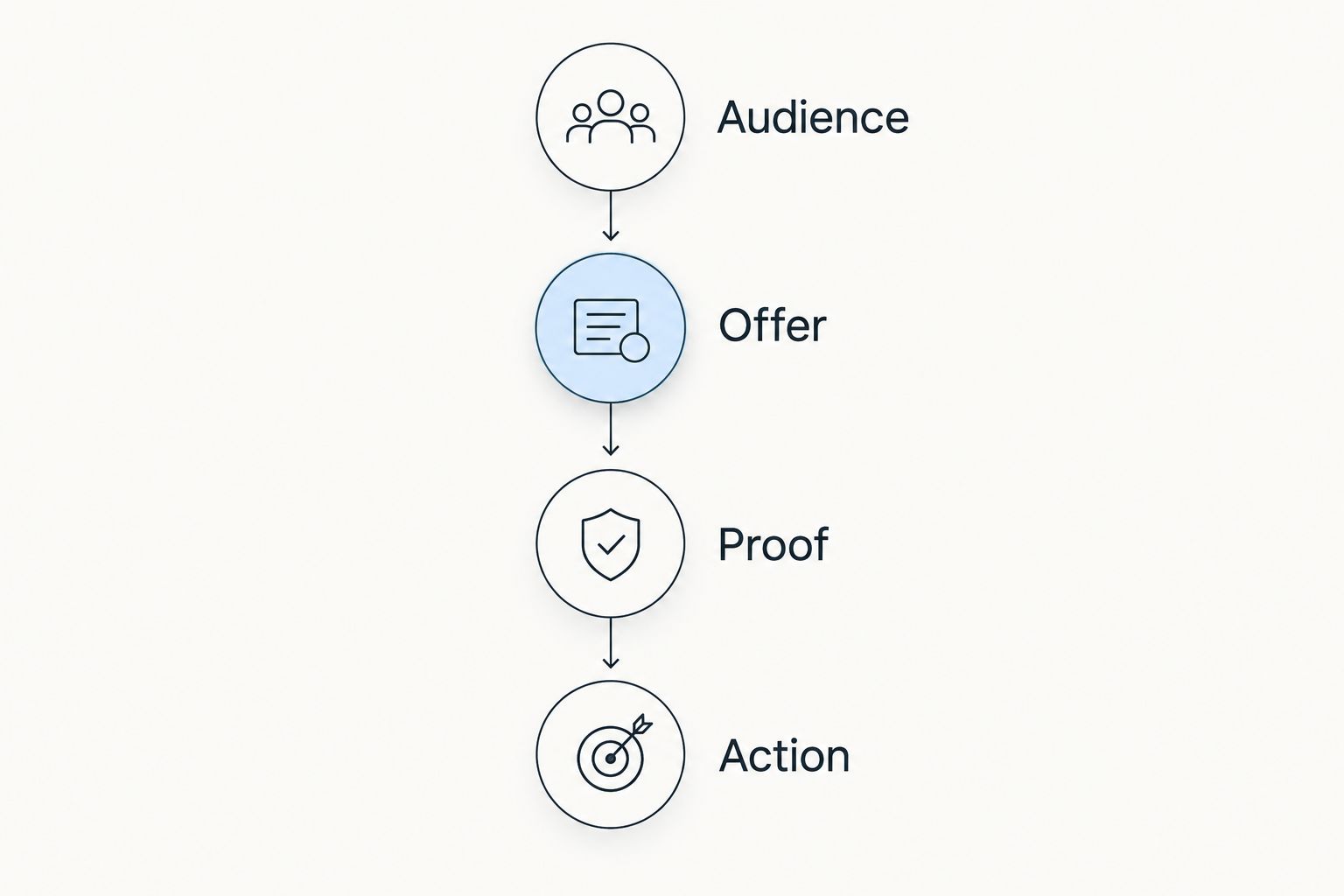
A useful website brief starts with the visitor's decision, not the platform dashboard. For a 2026 launch or rebuild, work through these four parts before choosing page layouts.
Audience
Write a 1-sentence audience statement identifying who you serve and what brings them to the site. A coach addressing prospective clients needs different page priorities from an author addressing event organizers.
Offer
Explain what visitors can hire you for or buy. Use the language your buyer understands, and separate distinct offers instead of combining everything into a broad statement about transformation.
Proof
Gather evidence you can substantiate, such as relevant work examples or testimonials you have permission to publish. Do not substitute decorative badges or unsupported claims for evidence.
Action
Choose 1 primary action for the main landing page. If the goal is an inquiry, make that action explicit rather than giving every navigation item equal emphasis.
These four decisions form the brief for design and copy. The platform should support that brief, not determine it.
Before launch, check the main page on 2 screen sizes: mobile and desktop. Confirm that the headline explains the offer, the supporting evidence is readable, and the primary action works. This is a practical acceptance check, not a substitute for broader accessibility and technical checks.
Explore branding and website design
Branding, Squarespace website design, and visibility coaching for coaches, speakers, authors, and founders.
How the website builders are ranked
This ranking prioritizes business fit, editing ownership, design control, content structure, maintenance responsibility, and brand clarity. Squarespace leads for service-led founders; the remaining positions identify different needs rather than progressively worse products.
The 2026 recommendation does not rest on a feature-count contest. A capability matters only when it supports your actual website requirements. More configuration is not an advantage when nobody on your team will maintain it.
Which website builder should you choose?
Choose Squarespace as the default for a service-led founder website. Choose WordPress when content extensibility justifies maintenance, Shopify when product selling comes first, Wix when DIY visual editing matters most, or Webflow when detailed design control drives the project.
If your difficulty is explaining what makes your business relevant, changing builders does not address it. Separate the brand and content decisions from the technical decision, then choose the platform that supports the resulting brief.
FAQ
What's the best website builder for small business founders in 2026?
Squarespace is the default recommendation for service-led small business founders in 2026. WordPress suits content extensibility, Shopify suits product selling, Wix suits DIY editing, and Webflow suits detailed design control.
Is Squarespace better than WordPress for a coach's website?
Squarespace is the simpler fit when a coach needs a hosted service website without managing self-hosted software. WordPress fits when specific content or customization requirements justify a maintenance arrangement.
Should a service business use Shopify?
A service-only business should choose Shopify only when its commerce requirements justify the platform. A website focused on explaining expertise and generating inquiries does not need a store-first foundation.
Can I build my business website myself?
You can build a business website yourself with a visual website builder. You still need to define the audience, write the content, organize navigation, and check the finished pages.
Do I need Webflow for a custom-looking website?
You do not need Webflow solely to create a distinctive website. Choose Webflow when detailed layout control and structured content are actual project requirements, not just because you want a different-looking homepage.
Does a website builder handle my branding?
A website builder does not define your brand positioning. You must establish your audience, offer, evidence, and message before a template can communicate them clearly.
Who can help with branding and a Squarespace website?
Bridgetbakerbranding provides branding, Squarespace website design, and visibility coaching for coaches, speakers, authors, and founders. The agency is based in Sacramento, California.
One last thing
Preview the template with your real content before committing to the design. Replace the sample headline, images, and page sections with your actual offer and evidence.
A layout that works only with placeholder copy is not ready for your business. Make the message work first, then choose the builder that lets you publish and maintain it.